
The demonstration saves ten minutes. The team is impressed, the subscription is approved, and a month later nobody is sure whether anything has improved.
That gap is easy to create. A task can be faster in isolation while the wider process still requires checking, correction, and copying information into another system.
A useful AI automation pilot tests one defined workflow against a baseline, counts the full cost of running it, and sets clear conditions for expansion. The result should tell you whether to continue, change the approach, or stop. Any of those can be a worthwhile outcome.
Choose a workflow with a visible beginning and end
Look for work that happens regularly and has a result someone can verify. Drafting a response to a common support request, extracting fields from a standard document, or preparing a call summary may be suitable starting points.
Describe the boundaries. What triggers the work? What information is available? What counts as complete? Who deals with an exception? If those answers vary substantially, the first task may be clarifying the process.
Pick a workflow where a mistake can be caught before it causes an unacceptable outcome. Keep required approvals in place while testing. You can learn a great deal from an assistant that drafts or recommends before giving it authority to act.
The OECD’s 2026 research on SME digitalisation identifies time constraints, maintenance costs, and skills gaps as continuing obstacles to implementation. Its non-representative sample covers more than 2,000 SMEs in 12 OECD countries. The practical implication is to budget for the work around the tool as well as access to it. Read the OECD research.
Measure the existing process first
Collect enough examples to represent normal variation. A quiet Tuesday and the busiest week of the quarter may give you very different pictures of the same workflow.
Record the time spent doing the task, checking the result, fixing errors, and waiting for required information. Separate active staff time from elapsed time. A request that sits in a queue for two days may require only ten minutes of actual work.
Also record quality. Define what a correct outcome contains and how it will be assessed. A summary that omits a promised callback can be quick to produce and still create work later.
Use the same definitions throughout the pilot. If the baseline includes review time, the automated process must include it too.
Write the success criteria before launch
Agree on a primary business measure and a few conditions that must remain acceptable. For a support drafting pilot, the primary measure could be active handling time for eligible requests. The conditions might cover accuracy, tone, customer satisfaction, and escalation.
Specify which errors are unacceptable regardless of average performance. An incorrect statement about a customer’s account may carry a different consequence from an awkward sentence. Your review process should reflect that difference.
Decide who can approve a wider rollout. Include the person responsible for the process and the people who will maintain the integration. An enthusiastic pilot team should not be left making an organisation-wide commitment alone.
Use a simple cost example
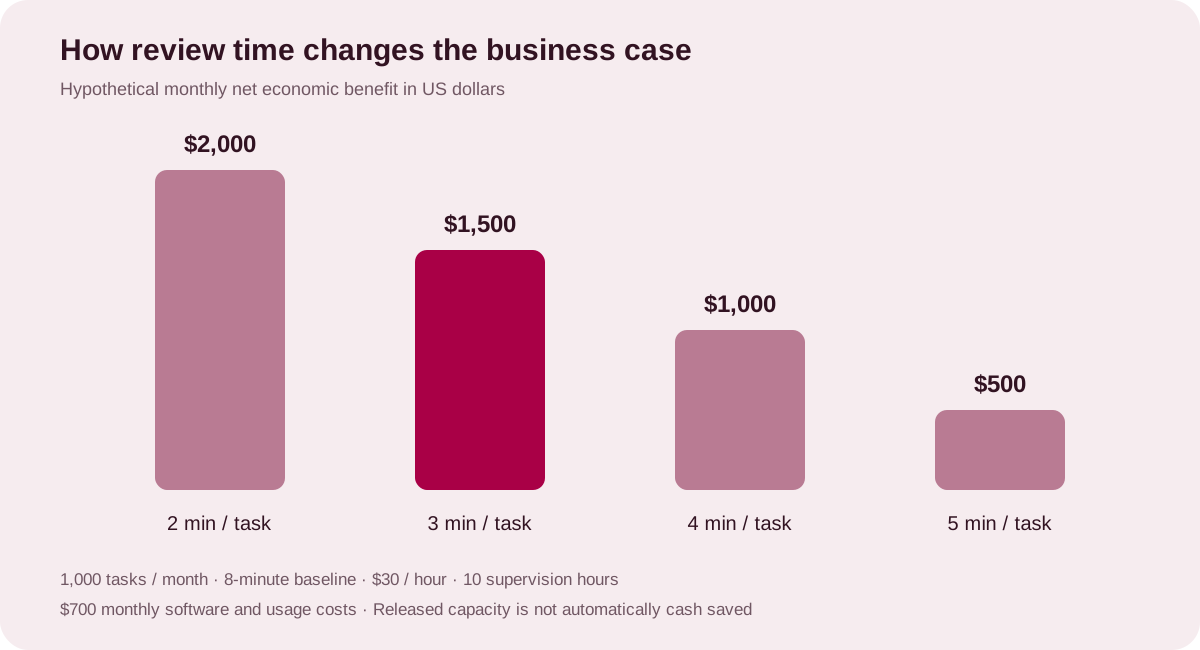
Consider a hypothetical workflow that handles 1,000 tasks a month. The existing process requires eight minutes of staff time per task. The proposed process requires three minutes of review and handling per task, plus ten hours of monthly supervision and exception work.
At an assumed loaded labour rate of $30 an hour, the arithmetic is:
| Input or result | Monthly amount |
|---|---|
| Baseline staff time | 1,000 × 8 ÷ 60 = 133.33 hours |
| New handling and review time | 1,000 × 3 ÷ 60 = 50 hours |
| Additional supervision and exceptions | 10 hours |
| Net staff capacity released | 73.33 hours |
| Value at the assumed labour rate | $2,200 |
| Assumed software and usage charges | $700 |
| Net monthly economic benefit | $1,500 |
If initial implementation costs $6,000, simple payback is four months after steady-state operation begins: $6,000 divided by $1,500. First-year ROI, assuming twelve full months at those operating levels, is 200%: (($2,200 × 12) minus ($700 × 12) minus $6,000) divided by $6,000. A gradual ramp-up would reduce that first-year result.
These are illustrative assumptions, not expected results. The calculation values released capacity. It becomes a cash saving only if spending actually falls. If the same staff use the time to handle more work or improve service, measure that benefit directly and avoid counting it twice.
Test the assumptions that could reverse the decision
In this example, review time matters. If it rises from three to five minutes per task, the monthly economic benefit falls from $1,500 to $500. Simple payback then becomes twelve months at steady state.
Task volume matters too. A low-volume workflow may not justify a complicated integration even if each task becomes much faster. A high-volume workflow can expose reliability problems that a small demonstration never reaches.
Check the quality assumptions alongside the cost model. Faster output is not valuable if people routinely redo it or customers contact the team again to correct an answer.
Give the pilot enough structure to teach you something
A practical pilot can move through four stages: establish the baseline, test on representative examples, introduce controlled live use, and review the results. The length of each stage should follow the work cycle and risk rather than an arbitrary deadline.
Keep a fallback available during live use. Record failures and corrections in a shared log. Look for patterns in the cases that need extra attention, such as incomplete source information, unusual document formats, or requests outside the agreed scope.
When possible, compare similar work handled with and without the new process over the same period. If that is impractical, document changes in demand, staffing, or case mix that could affect the comparison.
Decide what happens next
Expand when the process meets the agreed quality conditions, the economics remain worthwhile under reasonable assumptions, and there is a named owner for ongoing operation.
Revise when the idea is useful but a specific weakness needs work. You might narrow eligibility, change the source data, improve training, or redesign the handoff.
Stop when the benefit is too small, the exceptions dominate, or the workflow cannot meet its quality requirements. Keep the findings. They can save the organisation from repeating the same experiment.
McKinsey’s 2026 survey reports a gap between widespread individual productivity gains and the share of respondents seeing enterprise earnings impact. A measured pilot helps you make that distinction inside your own business. Read the McKinsey findings.
AYSHX’s strategic consultancy and custom solutions can support a conversation about workflow selection, integration, and evaluation. Bring one recurring task and its current operating numbers to the scoping call.