
The subscription looked reasonable when there were twelve users. Two years later, there are sixty, three paid add-ons, and a weekly spreadsheet export that only one person knows how to fix.
That does not automatically make custom software the right answer. It means the original decision deserves another look.
Compare custom software and SaaS over the same period, against the same requirements, including implementation and ongoing ownership. SaaS can be the better fit for a standard process. Custom software can make sense when an important workflow cannot be served well by available products. A small integration between existing systems may solve the problem with less disruption than either a full replacement or a complete build.
Start with the work that needs to change
Write down the problem without mentioning a product. “Customers wait two days while staff move order details between systems” gives you something to investigate. “We need our own platform” assumes the answer.
Separate essential requirements from preferences. An essential requirement might be a specific approval process, a customer access model, or support for a legacy data source. A preference might be a particular dashboard layout.
Ask whether the workflow is a meaningful part of how the business competes. Thoughtworks’ build-versus-buy framework treats business differentiation, technical fit, supplier evaluation, and proof of value as connected decisions. That is a useful structure for a conversation that can otherwise become a debate about licence fees. Read the Thoughtworks evaluation framework.
Understand what each option makes you responsible for
With SaaS, the supplier generally operates and maintains the core application. Your organisation still owns configuration decisions, access management, data quality, training, and the business process around it. Check the agreement for the actual division of responsibility.
With custom software, responsibility depends on the delivery and support contracts. Someone must maintain dependencies, monitor failures, manage backups, test changes, and respond to security issues. Those activities continue after the initial project is finished.
A hybrid approach uses purchased software for standard capabilities and custom work for a specific gap. It can preserve a reliable core while improving a distinctive workflow. It also introduces interfaces that need owners, documentation, and monitoring.
Build a cost model with explicit assumptions
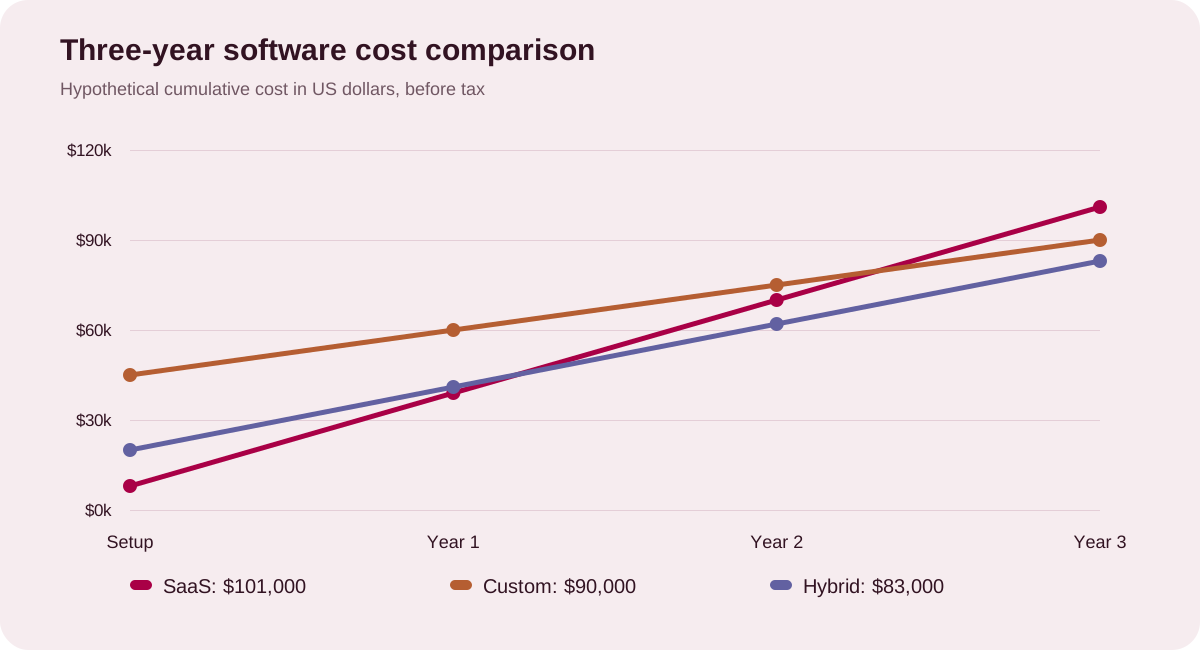
The following example is hypothetical. All amounts are in US dollars, held constant over three years, before tax and discounting. They are arithmetic inputs, not market averages or AYSHX quotes. Each option is assumed to meet the same core requirements for 40 users.
| Assumed cost | SaaS | Custom | Hybrid |
|---|---|---|---|
| Initial setup or development | $8,000 | $45,000 | $20,000 |
| Licences per year | $24,000 | $0 | $12,000 |
| Hosting, support, or integration upkeep per year | $3,000 | $9,000 | $5,000 |
| Internal administration per year | $4,000 | $6,000 | $4,000 |
| Three-year total | $101,000 | $90,000 | $83,000 |
In the SaaS example, licences are 40 users multiplied by $50 a month multiplied by 12 months. The annual recurring total is $31,000. Add three years of recurring costs to the initial $8,000 to reach $101,000.
The custom example assumes a $45,000 initial build and $15,000 in annual running and internal costs. The hybrid example assumes a $20,000 initial implementation and $21,000 annually. Actual proposals may include paid components, usage fees, and variable maintenance under any of these models.
Change the assumptions before trusting the result
The example favours the hybrid option at three years. It also assumes that the smaller custom layer can meet the requirements and that the existing platform supports the necessary integrations. Neither assumption should pass untested.
Double the custom build estimate and the result changes. Reduce the SaaS user count and it changes again. Add an expensive migration, a new reporting requirement, or a supplier price increase and you have a different decision.
Run at least three scenarios: expected usage, slower growth, and faster growth. Include a realistic allowance for changes you already know are coming. Avoid a precise-looking spreadsheet whose most important inputs are guesses.
Keep business benefits alongside costs. A cheaper system that delays fulfilment or frustrates staff may be more expensive to operate. Estimate those effects separately and state how you will verify them.
When SaaS is a sensible choice
SaaS deserves serious consideration when the process is common, the product fits the essential requirements, and the team needs a dependable capability quickly. A well-supported system may offer features and operational maturity that would be costly to recreate.
Use a demonstration based on your workflow. Ask the supplier to show imports, exceptions, permissions, reporting, and exports. A feature checklist rarely reveals how much work remains for your staff.
Read the limits that matter to your model: user tiers, storage, API usage, onboarding, support response, and data extraction. Confirm which capabilities require a more expensive plan.
When custom software earns its place
A custom build becomes more credible when the workflow is important, sufficiently understood, and poorly served by available options. The strongest case often involves a specific capability rather than replacing everything the company uses.
Ask for an initial discovery deliverable that makes the scope testable. It should explain the users, workflows, integrations, acceptance criteria, and major uncertainties. A prototype can resolve questions about usability before the full build begins.
Agree on source access, documentation, ownership terms, deployment responsibilities, and ongoing support. Ask what another competent team would need to maintain the system. Depending on one person’s memory creates an operational weakness regardless of who built the software.
When a hybrid approach is enough
Suppose the CRM works well, but staff copy confirmed orders into a separate operations tool. Replacing either platform could be unnecessary. A carefully scoped integration may remove the duplicate entry while preserving familiar systems.
Test exceptions as well as the successful path. What happens if an order changes after transfer? Which system is authoritative? How are duplicate requests prevented? Who investigates failed updates?
Integration work is valuable when those questions have clear answers. Without them, a connector can become another place where the team has to look for missing information.
Make the decision reviewable
Before committing, collect a requirements summary, comparable cost assumptions, a demonstration or prototype, named operational owners, and an exit plan. Record why the chosen approach fits and what would cause you to revisit it.
The best decision may feel fairly ordinary. It should leave the people doing the work with fewer manual steps, clearer information, and a system the organisation can afford to support.
AYSHX offers both custom software development and business software products. A scoping conversation can start with the workflow and compare the options against it.